Setting up NetlifyCMS with Wyam, Part 3

Use AppVeyor for CI
To get started with a simple NetlifyCMS setup without the editorial workflow you can use the AppVeyor for Continuous Integration Wyam document. # Enabling the editorial workflow ## Turn off webhook for PR to prevent extra build being triggered in AppVeyor
For more details see Do not build virtual merge on Pull Requests #1636 and Preventing master CI run when a commit a made on a feature branch
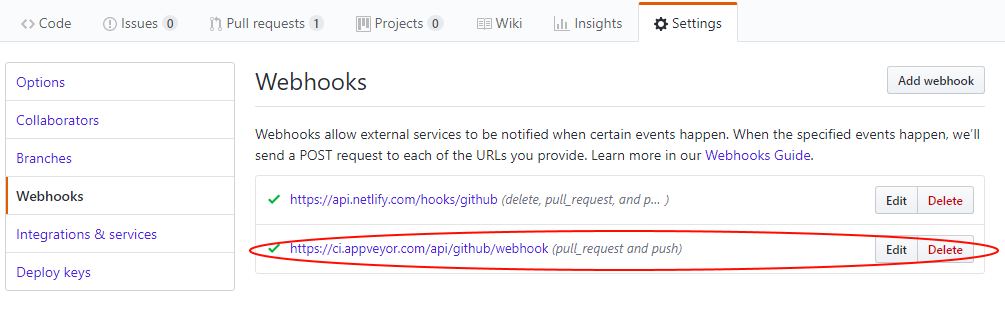 If this is not done AppVeyor will run the master branch config when a draft is saved in NetlifyCMS as a PR is created, it will fail with
git push
remote: Anonymous access to MarkZitherProjectName.git denied.
fatal: Authentication failed for 'https:/github.comMarkZitherProjectName.git'
Command exited with code 128
```  ## Advanced AppVeyor config to support Editorial_Workflow
When a blog post is saved as a draft it will create a branch starting with 'cms', use the for branches with a regular expression to control different aspects of the build on master and cms branches, here is [an example of this in action](https:/github.comNokNokMLSBigDoorWyamBlogblobmasterappveyor.yml)
for: # override settings for master branch
- version: 1.0. branches: only: - master ####################### # removed for brevity # ####################### # override settings for
cms*branches - branches: only: - /cms.*/ deploy:
git push remote: Anonymous access to MarkZitherProjectName.git denied. fatal: Authentication failed for 'https:/github.comMarkZitherProjectName.git' Command exited with code 128
This is caused by the PR firing a Webhook which triggers the build on the master branch.  ## Other things to write about
* show the correct loggedlogged out menu based on [Netlify Identity Widget](https:/github.comnetlifynetlify-identity-widget) events and user object.
* how to populate the author field from the Netlify Identity metadata.